For Insurance agency Owners and administrators.
Guides in this chapter
Open the agency settings
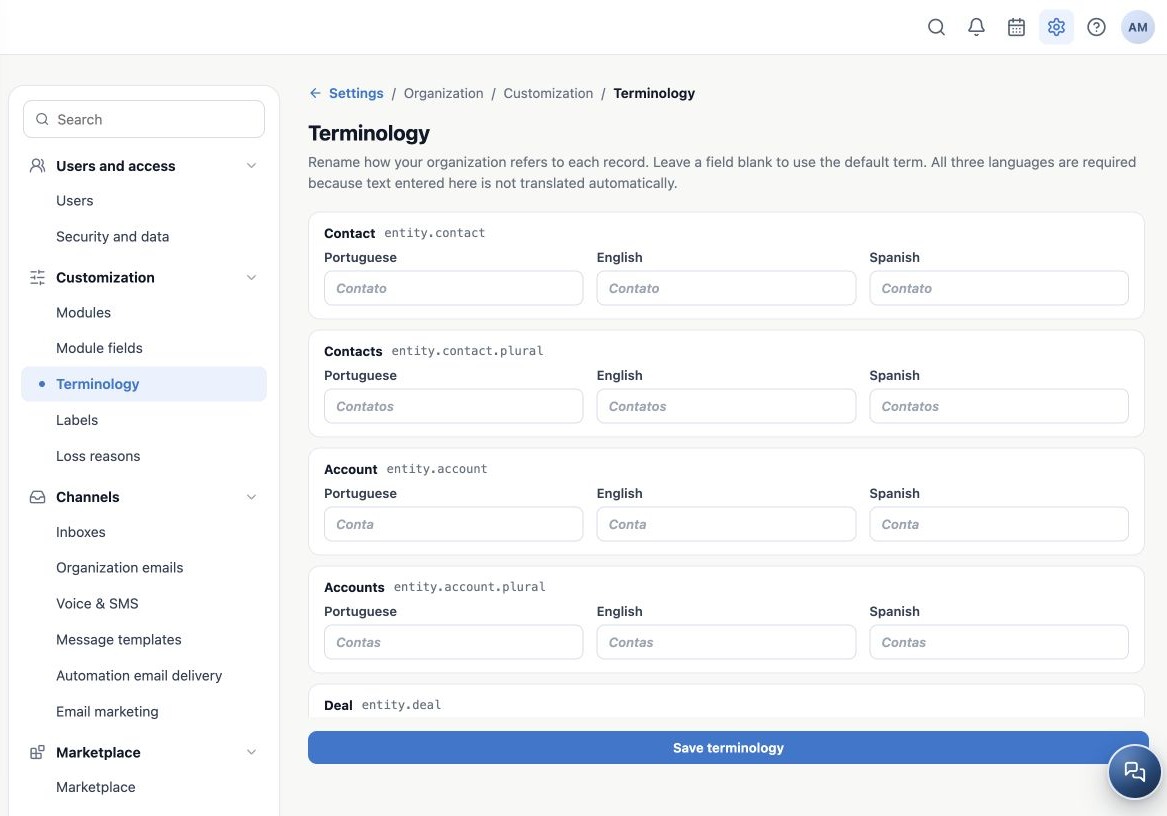
As an Owner or administrator, open Administration → Settings → Customization → Terminology. Check the active agency before editing. The setting applies to that organization, rather than only to the user making the change.
Each available term has separate Portuguese, English and Spanish inputs. Gray text in an empty input is an inherited reference, not text you have already entered. The small identifier, such as entity.contact, distinguishes the term and does not need editing.
Choose names that preserve the meaning
An agency may prefer Client and Clients instead of Contact and Contacts. This changes labels that consume the terminology, but a contact can still be a lead, a prospect or an existing client. Renaming does not convert leads into insured clients or create policies.
| Available terms | Example team decision |
|---|---|
| Contact / Contacts and Related contact | Keep the defaults or use Client / Clients and Related client. |
| Account / Accounts | Use a name consistent with company records. Do not confuse it with a policy. |
| Deal / Deals | If useful, use Opportunity / Opportunities. |
| Task / Tasks | Consider Activity / Activities. |
| Meeting / Meetings, Service / Services and Appointment / Appointments | Adjust only when these features belong to your operation. |
Recognize the limits of customization
Terminology changes presentation names where supported. It does not rename every system sentence, the manual, custom fields, Kanban titles, labels or loss reasons. It also does not change permissions, stages, calculations, integrations or API names.
The agency shares this vocabulary. Agree on names before saving and give the team a small glossary: “Clients in our agency corresponds to Contacts in the manual.” This keeps a language preference from making training and support harder.
Related guides
- Customize terms in all three languages
- Restore inherited terms and resolve common questions
- Labels
- Loss reasons
- Administrator manual
Updated October 25, 2026.