For Insurance agency Owners and administrators.
Use Save paused while setup is incomplete
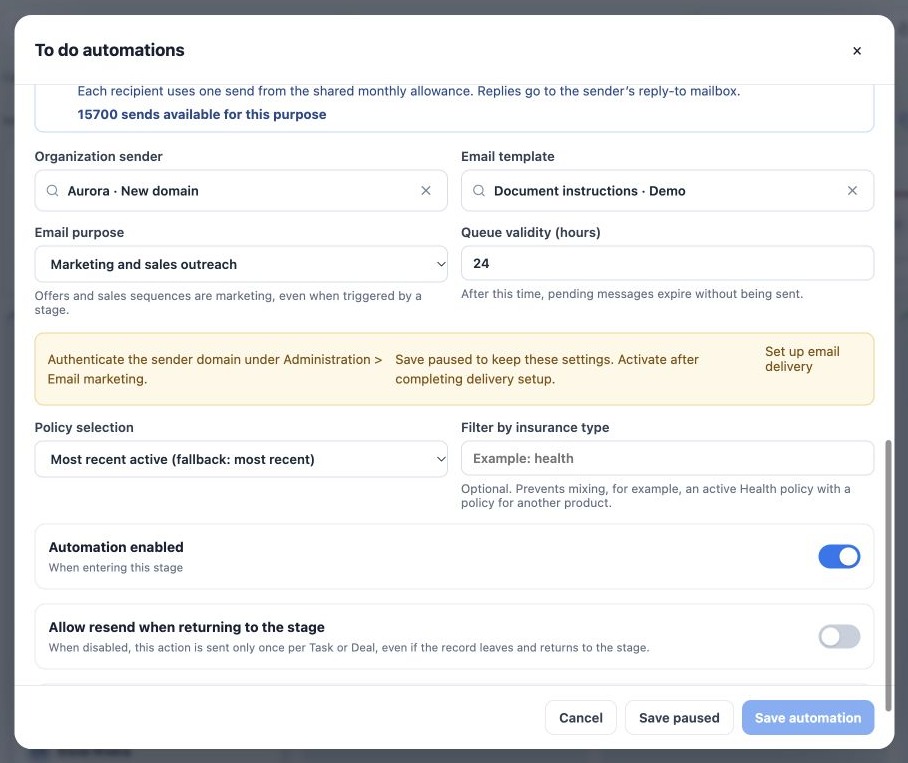
If the form reports an unauthenticated domain, exhausted allowance, unavailable sending or missing confirmation, read the blocker before activating. The image’s fictitious subdomain is not authenticated. Activation is blocked even though another identity in the same agency may be ready.
- Keep parameters using Save paused.
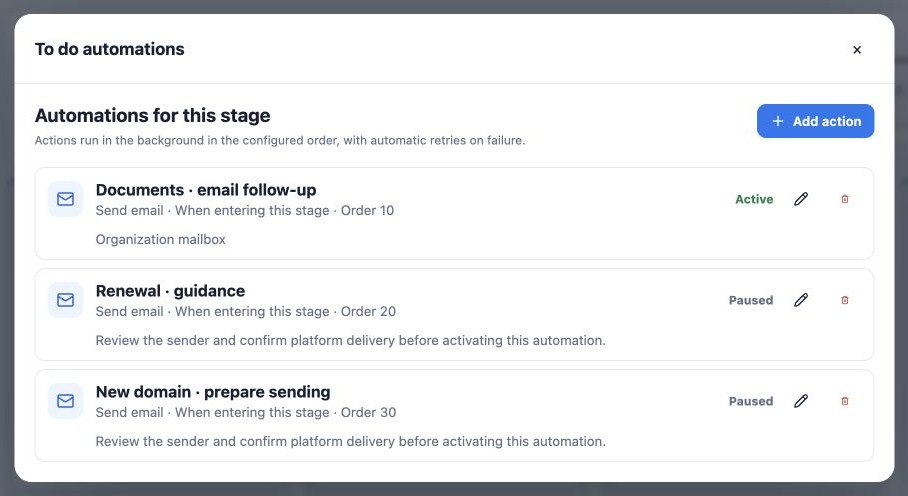
- Confirm the list shows Paused.
- Complete setup through the indicated link.
- Edit again, review method and sender, and renew confirmation before saving enabled.
Save paused preserves work without enabling new triggers for that rule. Pausing does not undo messages already accepted by a provider.
Test before using at scale
- Use a fictitious contact with an authorized test email address you can check.
- Review stage, event, template, language, links and populated data.
- Enable the prepared rule and trigger the event only for that test record. Avoid moving a bulk selection as a test.
- Open Delivery Center to check processing, and inspect the destination mailbox and expected reply destination.
- Check subject, content, personalization and links. For Open Enrollment, confirm the correct form opens.
- Then use the rule in the real process and monitor initial sends.
Provider acceptance does not mean delivery, reading or primary-inbox placement. Connected-mailbox delivery should not be assumed to provide every email marketing delivery or open event. Do not validate solely from a counter.
Handle pending messages separately
Delivery Center provides sending follow-up. Open the item and read its state, reason and available actions. Fixing a domain, reconnecting a mailbox or saving an automation does not automatically resume older messages.
Each pending message retains its original delivery method. Switching a rule between mailbox and email marketing neither converts the old queue nor creates an automatic fallback. Review pending items in Delivery Center and use the offered resume action only for eligible items; review or cancel incompatible items as appropriate.
Expired messages should not send again. If a mailbox attempt has an uncertain result, do not force a retry: check the provider’s sent mail first and ask support to investigate. This avoids duplicating a message that may already have been accepted.
Resolve the reported blocker
| Situation | Check |
|---|---|
| Sender missing | Selected method, organization account, connection and access. Reselect after changing methods. |
| Domain pending | Exact selected address domain, including subdomain; review Email marketing. |
| Allowance or pause | Purpose balance, organization status and pause controls in Email marketing. |
| Mailbox disconnected or provider limit | Mailbox connection and provider diagnostics. Reconnection does not resume old pending items. |
| Did not trigger again | Enabled rule, correct event, contact association and return-resend setting. |
| Expired or uncertain result | Check Delivery Center; do not recreate bulk triggers to bypass the state. |
An email marketing pause or exhausted allowance does not itself require domain authentication for connected-mailbox delivery. Each method has its own requirements. Give support the agency, automation, stage, time and error message without sending passwords.
Related guides
Reviewed October 26, 2026.