For Insurance agency Owners and administrators.
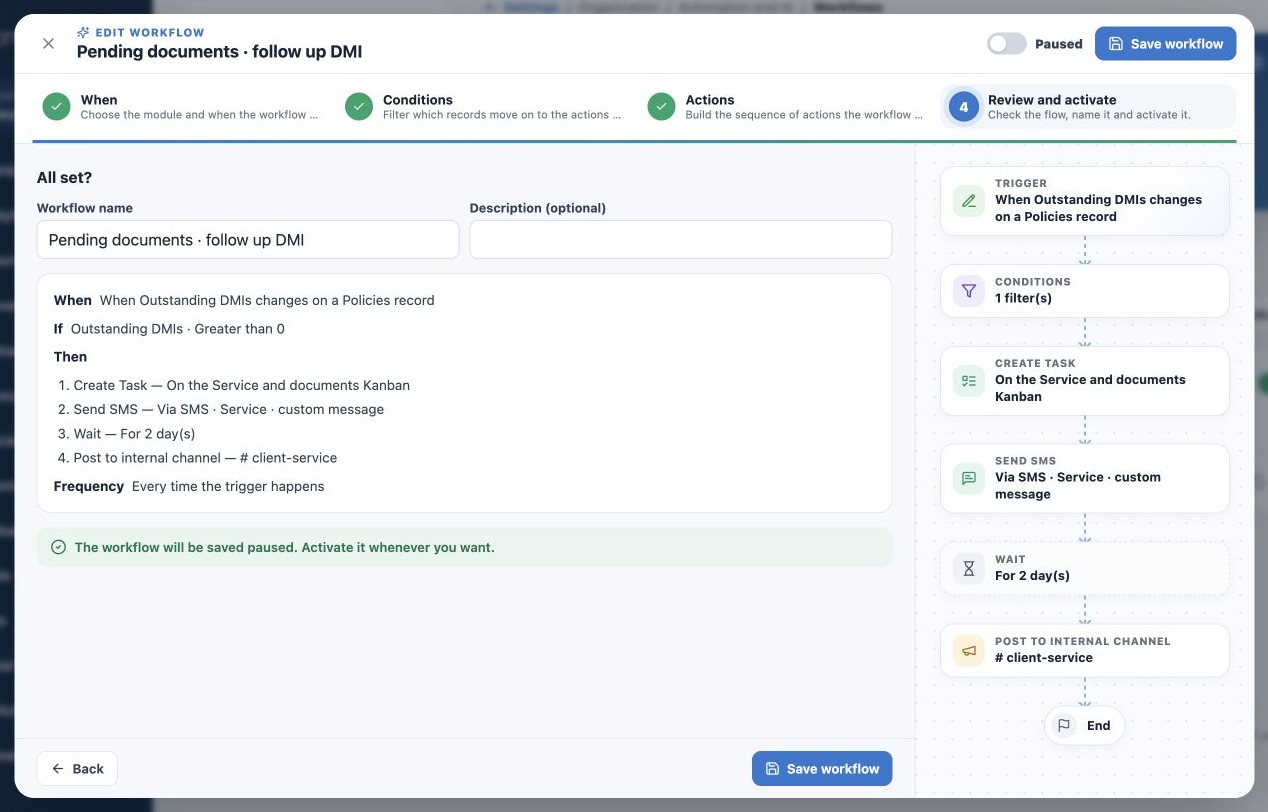
Check Review and activate
- In the fourth step, name the outcome and timing and optionally describe it.
- Read When, If, Then and Frequency. Check source record, filters and action order.
- Click incomplete items to return and correct them.
- Check Active/Paused. A template may open active; do not assume paused.
- Save paused during preparation, then reopen to verify saved choices.
Saving active starts the workflow without a separate publication step. This interface has no simulation button guaranteeing an effect-free rehearsal. Saving paused prepares the rule; it does not test messaging or Task creation.
Run a limited test
- Choose an authorized test record/destination and a condition limiting scope to it.
- Check action resources. If messages are not ready, first test a Task-only or internal-notice flow.
- Activate when ready and generate the matching event for one record. An edit must actually change the tracked field.
- Open Runs and inspect each step; open created Tasks or Deals and check relationships.
- For messages, inspect Delivery Center and confirm receipt at the test destination.
- After validation, pause to set final filters and review again before real use.
Do not start with an entire import, bulk update or date covering the whole book. Date triggering depends on its configured time and timezone, not opening the page.
Activate, pause, duplicate and remove deliberately
The list switch activates or pauses. Pausing prevents new triggers and cancels pending runs; it is not a promise to freeze and later continue at the same point. Reactivation does not automatically restore canceled runs. Already accepted emails/messages cannot be recalled by this switch.
Duplicate opens a new paused configuration for another purpose or language. Review resources and content. It has independent execution control; enabling both original and copy can duplicate communications. Delete removes the flow from operation while preserving run history.
Coordinate maintenance changes
If another administrator changed the rule, reload before saving again to avoid replacing a newer version. When replacing templates, inboxes, Kanbans or assignees, review dependent workflows. Change one thing at a time and monitor early results.
Interface language does not translate custom messages or Task titles. Use audience-appropriate versions and test personalization. Do not assume one text automatically translates per client.
Related guides
- Understand when to use agency Workflows
- Configure triggers, dates and frequency
- Filter records and control behavior after a wait
- Build workflow actions and channels
- Monitor runs and resolve failures
- Administrator manual
Reviewed October 26, 2026.