For: CRMDAY One users with the Insurance profile.
Open the right policy
- Enter Policies and search for the client, plan or known number. Check active filters if the record does not appear.
- You can also open a policy from the contact’s portfolio or application history.
- Check person, carrier, product and year before editing. One client may have several policies, including different years.
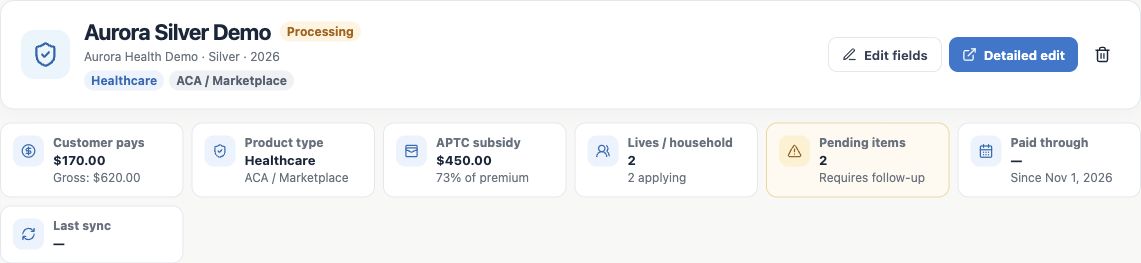
- Read the header and indicators. In this example, Aurora Silver Demo is Processing; the client pays $170, two people are applying and two pending items need follow-up.
Understand the record sections
| Section | What you find |
|---|---|
| Source and application | Identifiers and source status when available, plus submission and effectuation dates. |
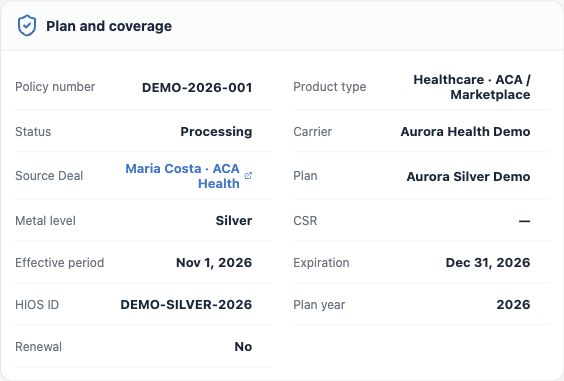
| Plan and coverage | Number, product, status, carrier, originating Deal, plan, effective date, expiration and year. |
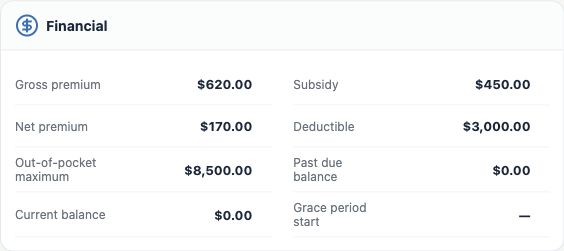
| Financial | Premium, subsidy, net premium and, for ACA, costs and recorded financial indicators. |
| Applicant and eligibility / Household | Primary applicant, application information and family members linked to this policy. |
| Operations and compliance | Client Manager, documentation, pending items, Paid through, agent and NPN. |
| ID Cards, Notes and Attachments | Cards by person, internal context and supporting documents. |
A blank field means information is missing from the record, not confirmation that nothing is outstanding. Check the proper source when completing a detail.
Make a small correction with Edit fields
- Click Edit fields in the header. The system indicates inline editing is active.
- Select the pencil beside the relevant field. Check the previous value and change only what is needed.
- Confirm within the field and wait for the update. If an error appears, read it before continuing.
- Finish inline editing when done. Reopen the record and check that the new value remains.
To review several fields together, use Detailed edit, make the changes and save. In either case, changing the CRM does not replace a change that must be completed with the Marketplace or carrier.
Check amounts and relationships
For ACA, gross premium is the amount before subsidy; net premium is the client’s recorded share. Deductible and out-of-pocket maximum are separate from the monthly premium. In the fictitious example, the client pays $170 from a $620 gross premium, with a $450 subsidy.
- Check effective and expiration dates and the plan identifier.
- Check the linked contact and originating Deal where applicable. Do not move a policy to another person merely to fix a name.
- If editing income, also check the contact record: the health-policy flow can update it.
- For imported records, observe source, last sync and local adjustments. Manually corrected fields can be protected in later imports; understand differences between source and local record before changing them.
Verify the review worked
Reopen the policy and confirm corrected values and relationships. Use Audit trail and the contact timeline to check available authorship and history. If a field is unavailable or the record cannot be found, check permissions and filters with your agency administrator. Continue with Track status, payment and pending items.
Keep learning
- The client approved the quote: prepare the policy
- Create the policy with the wizard
- Track status, payment and pending items
- Organize documents and plan ID cards
- Organize after-sales service and the next interaction
- ACA quotes: save and share the simulation
- Manage opportunities and next steps
Updated October 24, 2026.