For: CRMDAY One users with the Insurance profile.
After creation, define the next action
The policy becomes the reference for tracking this client’s insurance. Service continues in the contact record, with tasks, conversations, emails and timeline. Make a clear handover from sales to service, even when the same person handles both.
- Check the saved policy and links to client and Deal where applicable.
- Record the approval outcome and remaining items: issuance, payment, document or card as applicable.
- Assign the follow-up and a specific date. Avoid vague notes such as “check later”.
- Update the opportunity according to your agency’s process without treating its stage as automatic coverage confirmation.
Use Tasks to keep deadlines
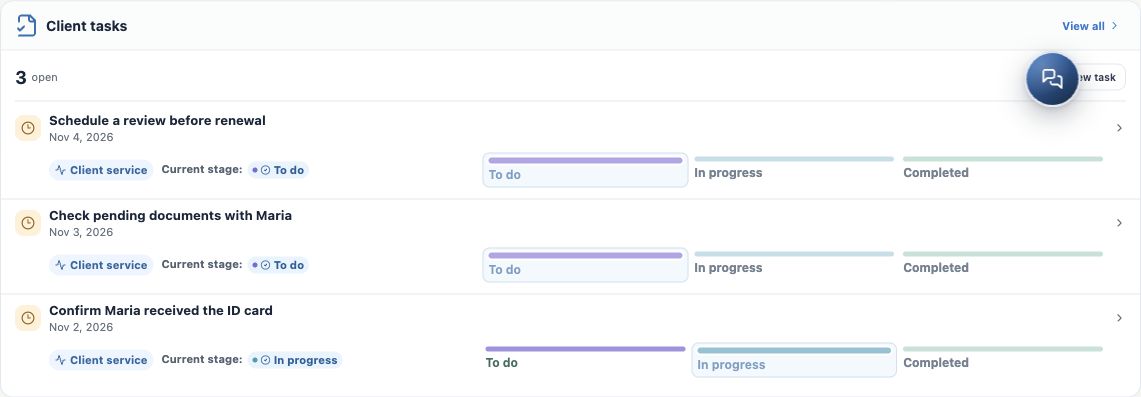
- Open the contact record and locate the client’s Tasks. Check existing tasks before creating another.
- Click the new-task action and write a verifiable outcome, such as “Confirm Aurora Silver Demo issuance with Maria”.
- Set due date, assignee and available links to contact, Deal and policy. Check the chosen record.
- Save and verify the task in the list or Kanban. Move it to the appropriate stage when starting or finishing the action.
- Record the outcome when complete and create another action if something remains outstanding. A completed Task does not by itself change policy status.
Record context for the next interaction
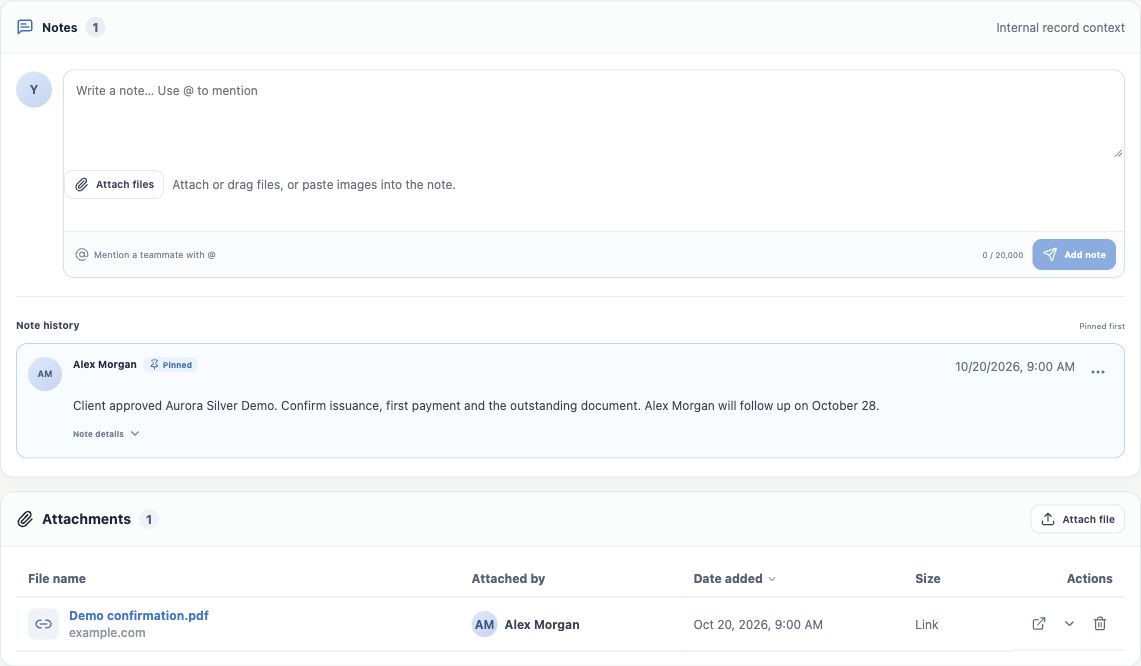
Use Notes for internal context and Attachments for evidence. A useful entry says what happened, what was confirmed, what remains and when to follow up. Example: “Client approved Aurora Silver Demo. Confirm issuance, first payment and the outstanding document. Alex Morgan will follow up on October 28.”
- Open the contact’s conversation or email for the agreed follow-up. Check recipient and language before sending.
- For a card request, check member and policy before downloading. For a quote request, check that the document is the right comparison.
- Record the outcome and consult the timeline to understand the history, avoiding requests for information already received.
Prepare reviews and renewals early
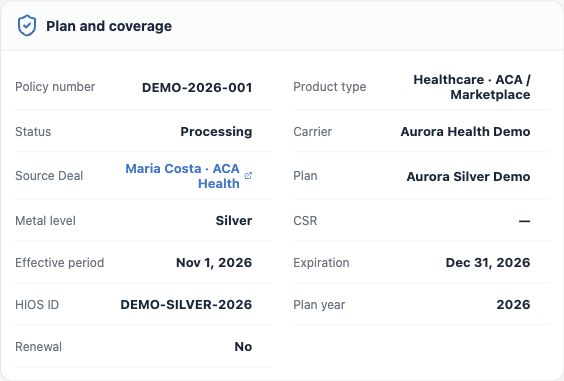
- Check effective date, expiration and year under Plan and coverage.
- Create a review task before your agency’s deadline. Confirm changes in contact details, address, family and needs with the client.
- Use portfolio alerts and policy filters to find records needing attention. Always open details to check each individual situation.
- If a new ACA quote is required, return to the contact’s quote flow and check the year. An old simulation does not automatically reflect renewal details or prices.
- Preserve the previous period’s history. Do not simply overwrite the old policy with a new year to simulate renewal.
Checklist for a complete handover
- Correct client and policy, with checked status and details.
- Identified documents and cards available in the appropriate place.
- Pending items with assignee, deadline and next action.
- Follow-up agreed in the client’s language and channel.
- Previous-period records and history preserved.
If a policy or document cannot be found, check filters, year and permissions before creating duplicates. This section ends with organized follow-up; daily service continues through Tasks and the contact record.
Keep learning
- The client approved the quote: prepare the policy
- Create the policy with the wizard
- Review and update the policy record
- Track status, payment and pending items
- Organize documents and plan ID cards
- ACA quotes: save and share the simulation
- Manage opportunities and next steps
Updated October 24, 2026.