For Insurance agency Owners and administrators.
Close the opportunity with the right cause
- Open Deals and choose the correct pipeline and card. Check the client and opportunity.
- Move the card to a stage configured as Lost. The stage type defines the loss; merely naming an open stage “Lost” does not replace that configuration.
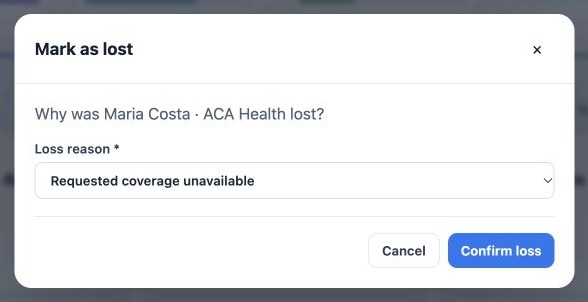
- In Mark as lost, choose the Loss reason from the list.
- Click Confirm loss. Cancel closes the dialog without confirming that move.
- Reopen the Deal and verify status, stage and reason. Add a concise context note; if a future follow-up is appropriate, create a Task with date and owner.
In the example, the fictitious Maria Costa · ACA Health opportunity receives Requested coverage unavailable. Confirmation becomes available only after selecting an option. The image shows selection before confirmation.
When an option is missing
The selector offers + Add new reason…. Users with Deal-edit permission can create an option here by entering a name and confirming the addition. It joins the shared catalog and becomes selected; the loss must still be confirmed. Ordering, renaming and archiving the catalog remain Owner or administrator tasks.
Avoid a new option for every client. Look for an equivalent cause and follow agency rules. If the reason was archived, choose a valid alternative or request reactivation. If someone archived an option while your dialog was open, reload the list before trying to save.
Review commercial results consistently
In the Deals list, use available filters for lost opportunities, period, pipeline, owner and reason. Open sample records before concluding that a pattern exists. Use the same scope when comparing indicators and reports available to your access.
| Observed pattern | Management follow-up |
|---|---|
| Many losses due to premium | Review budget conversations and the comparisons presented. |
| Many losses without a reply | Review first-response time and follow-up routines. |
| Many Other losses | Read notes and decide whether a recurring cause deserves its own option. |
| Many network-related losses | Improve collection of client needs before comparing plans. |
Reasons are information entered by the team, not an automatic system conclusion. Do not rename or archive them to make numbers look better. A commercial loss also does not close related conversations, Tasks or policies; review outstanding work separately.
Related guides
- Plan and create loss reasons
- Order, rename and archive reasons safely
- Terminology
- Labels
- Administrator manual
Updated October 25, 2026.