For Insurance agency Owners and administrators.
What you can change after creation
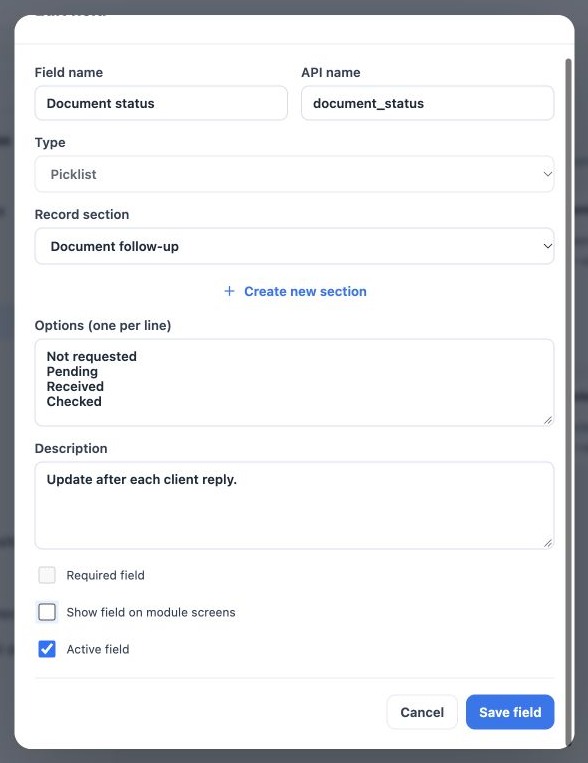
Open the card’s Edit field pencil. Review label, description, options, section and usage controls. The editor locks API name and type. Renaming a label does not populate values or translate existing records.
Before changing a used list, check example records, saved filters and processes that rely on its options. Renaming Received to Documents received should not be treated as migration of every existing value.
Three different controls
| Control | Effect |
|---|---|
| Required field | Requires a value in workflows that validate the field. Consider when the information becomes available. |
| Show field on module screens | Controls presentation. Hiding the field removes its required setting. |
| Active field | Keeps or withdraws the definition from operational use while preserving existing values. |
Hidden is not profile-based protection. Configure Security and data to restrict who can view or edit sensitive values. A field hidden from a form is not a secure vault.
Change and verify the settings
- Open the field in the correct module.
- Adjust the control. To hide it, clear Show field on module screens and confirm Required field is cleared and unavailable.
- To suspend use, clear Active field.
- Click Save field and reopen the catalog.
- Test an existing record and a new record.
- To restore use, reactivate and make it visible as needed; review the required setting again.
There is no field-delete button in this editor. Hiding or deactivating does not erase existing values and is different from clearing a value on an individual record.
Introduce requirements without disrupting work
Start optional, align staff input and review existing data. Make the field required when appropriate for the point in the workflow. In Accounts, Tasks, Deals and Policies, editing another record attribute without changing custom fields does not require retroactively completing every new field.
Imports and internal processes may follow their own rules to preserve operations. Required does not guarantee every historical or imported record has a value. Monitor empty values with filters and plan completion.
Related guides
- Plan your fields and choose the right module
- Organize fields into record sections
- Fill fields on records and use filters
- Validate fields, languages and integrations
- Administrator manual
Updated October 25, 2026.