For Insurance agency Owners and administrators.
Plan the structure first
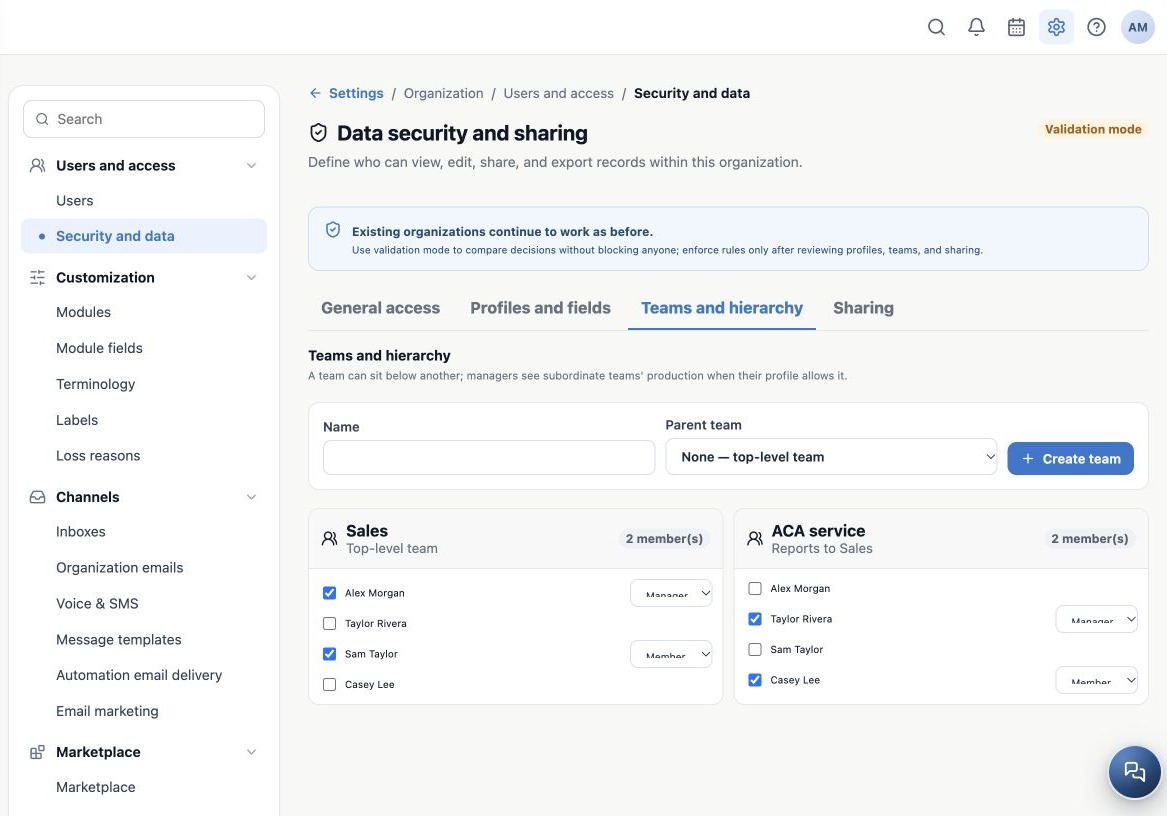
Open Security and data → Teams and hierarchy. A team organizes people inside the same agency. Example: Sales as a main team and ACA service as its subordinate. Alex oversees operations, Taylor coordinates service, and Sam and Casey join the appropriate teams.
Hierarchy helps define record scope, but creating a team alone does not grant access. Profiles, scopes, module defaults and enforcement determine the result. An internal team does not represent another agency, FMO or upline relationship.
Create the team
- Enter the Name, for example Sales.
- For Parent team, select None — main team.
- Click Create team.
- For the subordinate group, enter ACA service and select Sales as the parent.
- Create it and check the parent relationship shown in the list.
Choose its position in the structure when creating it. The current screen supports creation, membership and member roles; it has no full editor for renaming, moving or deleting teams. Coordinate further restructuring with support.
Add people and managers
- On the team card, check its active participants.
- Beside each selected person, choose Member or Manager.
- Wait for confirmation; changes save when selected.
- Reopen and confirm membership and roles.
- Under Profiles and fields, check Team scope for members and whether managers need Team and subordinates.
A person may belong to several teams. Review the combined effect. Team Manager, organization Administrator and the Producer affiliation role Manager serve different purposes.
Verify with a realistic service scenario
Use fictitious test records with different Owners in a test environment. Sam should see the intended Sales scope, Casey the service scope, and Taylor the scope authorized by team and profile. Also check a record from a team each person does not belong to.
If someone sees too much, review public defaults, extra profiles and shares. If they see too little, check active membership, the actual record Owner and scope. Teams organize record owners; they do not change client Owners or move books between organizations.
Related guides
- Plan users and access for your agency
- Protect fields, SSN and call visibility
- Share books and records without changing ownership
- Validate rules and maintain everyday security
- Administrator manual
Updated October 25, 2026.