For Insurance agency Owners and administrators.
Guides in this chapter
- Invite users and enable their first sign-in
- Manage user roles, status and offboarding
- Configure your agency’s Producers
- Choose the access model and module defaults
- Create profiles and define actions and record scopes
- Protect fields, SSN and call visibility
- Organize teams and service hierarchy
- Share books and records without changing ownership
- Validate rules and maintain everyday security
What this chapter helps you do
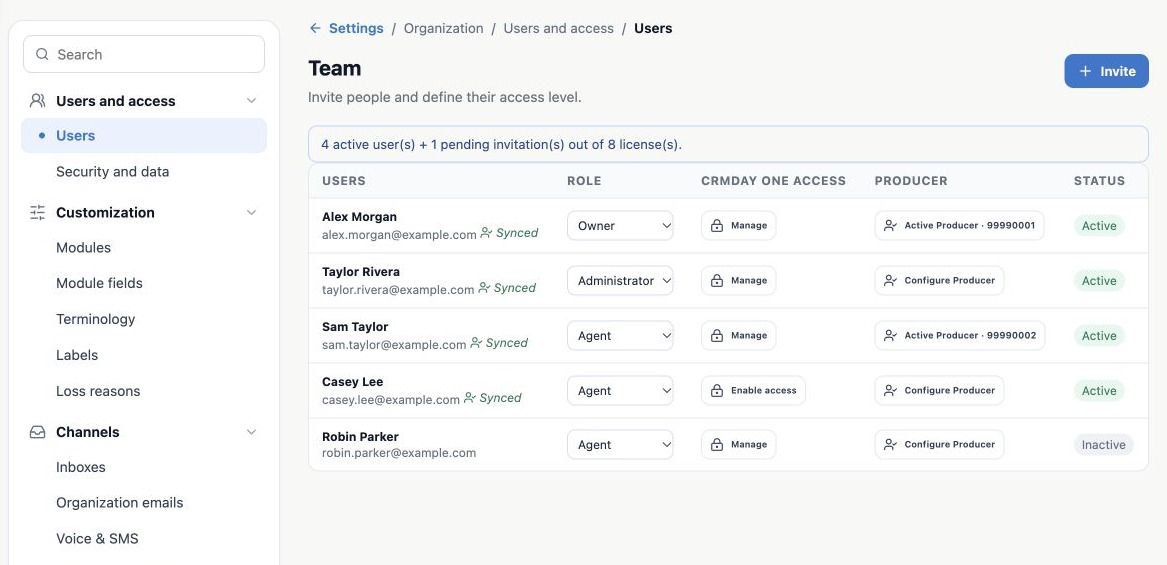
This chapter is for Insurance agency Owners and administrators. It explains how to onboard a person, organize teams and decide who can view or change data. Open Administration → Settings → Users and access. The two main entries are Users and Security and data.
| Area | What you control |
|---|---|
| Users | Invitations, organization role, access activation, status and Producer setup. |
| Security and data | Access model, module defaults, profiles, actions, scopes, fields, teams and sharing. |
Keep these four concepts separate
- Organization role: Owner, Administrator or Agent. This defines administrative responsibility.
- Permission profile: a set of actions and record scopes. A person can have several profiles.
- Record Owner: the operational person responsible for a contact, policy or task. This does not make that person the organization Owner.
- Producer: identifies the professional responsible for production and their NPN. Enabling a Producer does not grant administrative access or replace permission profiles.
An example used throughout these guides
At the fictitious Aurora Insurance Demo agency, Alex manages the account, Taylor coordinates service, Sam produces ACA business and Casey follows up on client documents. Sam may need only his own book, while Casey receives access to the records needed to request documents. Robin is a former team member who should remain inactive.
Before configuration, write down each person’s role, required modules, allowed actions, accessible book, team and need for sensitive data. Avoid giving broad access simply to solve one missing record.
Recommended setup sequence
- Check licenses and invite people.
- Review roles, status and Producers.
- Choose the access model and module defaults.
- Configure profiles and fields, then assign profiles to users.
- Create teams and the necessary sharing rules.
- Validate scenarios before enforcing the rules.
Security configuration applies inside the selected organization. A commercial relationship with another agency does not automatically share your clients. Features and channels may also depend on your subscription.
Related guides
- Invite users and enable their first sign-in
- Validate rules and maintain everyday security
- Administrator manual
Updated October 25, 2026.