For: CRMDAY One users with the Insurance profile.
What you will track
In CRMDAY One Insurance, Open Enrollment can be organized as a process: choose clients, create cards in a Kanban, request updated details, receive answers and documents, review and prepare next year’s coverage. The card organizes team work; the form records what the client reported and signed; the new policy comes later.
Here, fictitious Aurora Insurance Demo prepares 2027 renewals. Alex Morgan follows clients including Maria Costa, Bruno Silva and Elena Rivera. The board and stage names are a suggested structure your agency can adapt.
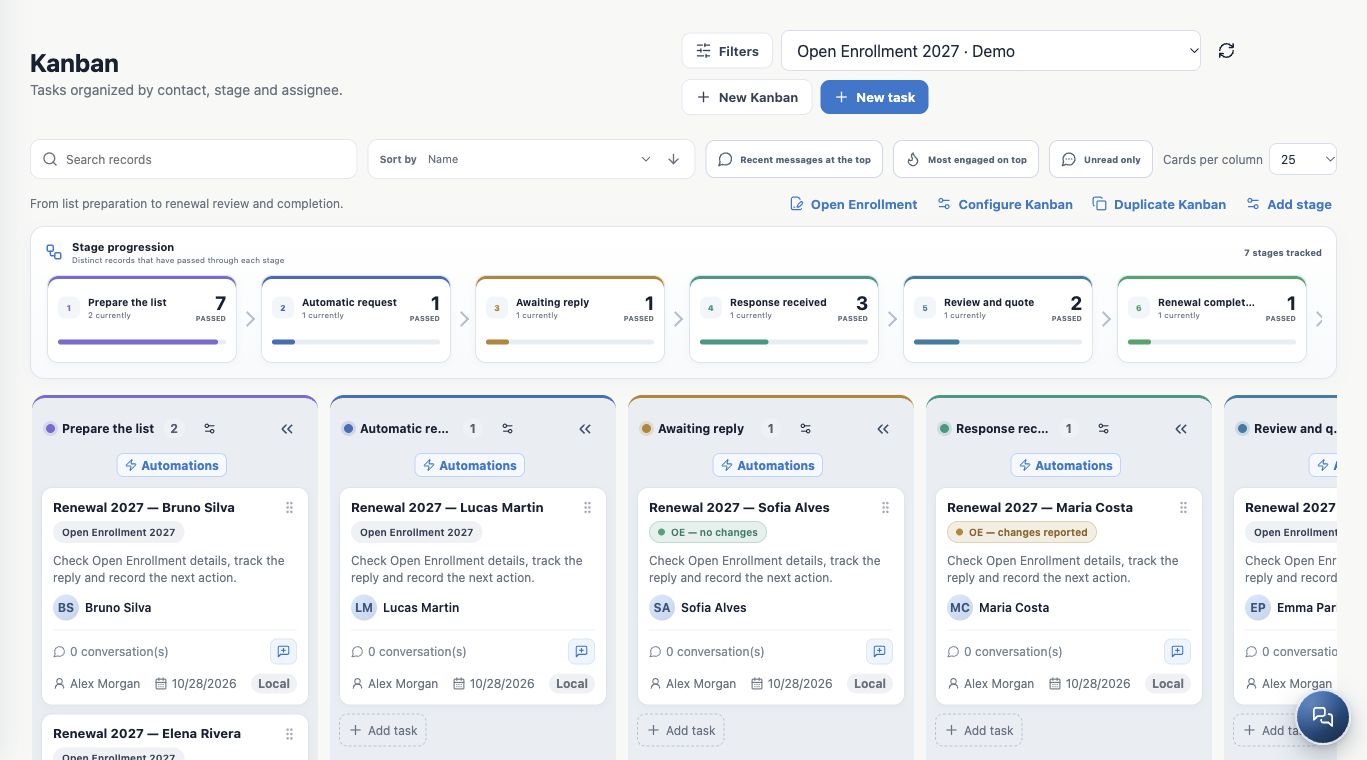
A dedicated campaign Kanban
Ask the administrator to create or prepare Open Enrollment 2027. In Kanban, use New Kanban, board settings and the add-stage action as needed. Check assigned people, stages and existing automations before adding clients.
| Suggested stage | Role |
|---|---|
| Prepare the list | Receive cards and check client, year, contact details and channel before sending. |
| Automatic request | Receive only cards intended to trigger Open Enrollment automation. Cards await signature here. |
| Awaiting reply | Track clients invited through a bulk campaign. This example has no invitation automation on this stage. |
| Response received | Collect completed and signed forms for checking. |
| Review and quote | Check details, resolve outstanding items and prepare next year’s coverage. |
| Renewal completed | Close after review and confirmation of the actual renewal outcome. |
| Not renewed | Close a case that will not proceed with renewal and record the reason. |
Automatic request and Awaiting reply separate two sending strategies. A card’s position does not prove message delivery: check processing in the delivery hub.
Choose an entry and sending strategy
| Starting point | Path |
|---|---|
| An existing ACA policy portfolio | Policies → Open Enrollment → select the portfolio → create cards in the chosen destination. |
| A list of people | Contacts → select clients → Create Kanban cards → choose board and stage. |
| A stage-entry rule | Move the card to Automatic request after configuring and enabling orchestration. |
| A group you want to send now | Select cards in Prepare the list and prepare bulk sending with the associated form. |
For the same client and year, check for an existing card or request first. Contacts and Policies are alternative entry paths; you do not need to run both for the same people.
Distinguish the form, invitation and approved template
- Open Enrollment form: contains questions, details to review, documents and signature acknowledgements.
- Message template: is the email, SMS or WhatsApp invitation containing the individual form link.
- Official WhatsApp approved template: is the authorized inbox version, with compatible language and parameters. Ordinary saved text does not replace approval.
With the administrator, check the form, Producer and NPN, agency details, templates in all three languages and the sending channel. Board, rule and template configuration may require administration access; card operations depend on your permissions.
Configure closure while preserving history
In a board stage’s automations, the administrator can find Stages that close renewal. Map Renewal completed to the completed outcome and Not renewed to closure without renewal. Leave intermediate stages without closure and save the settings.
These outcomes close tracking and remove temporary highlights while preserving history and documents. They do not activate a policy. Confirm the real outcome before moving a card to a final stage.
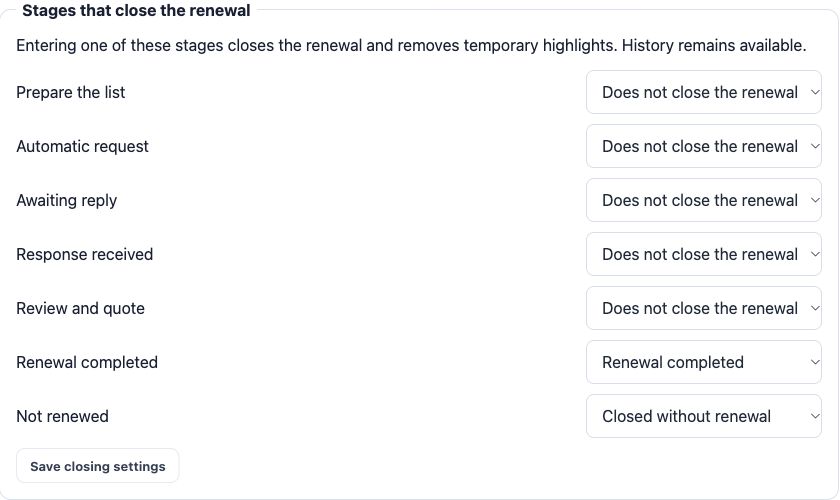
Check before adding clients
- Correct year: 2027 is this chapter’s example, not a value to repeat for every campaign.
- Board and stages defined, with no unexpected sending at the starting stage.
- Form, Producer, templates, recipients and channels checked.
- One clear sending strategy per group, avoiding automation and bulk sending for the same invitation.
Continue with starting from Policies or starting from Contacts.
Keep learning
- Start Open Enrollment from your policy portfolio
- Select contacts and create cards in the renewal Kanban
- Automate invitations and card return after signature
- Send Open Enrollment forms in bulk from Kanban
- Track responses, review details and complete renewal
- Request documents and signatures
- Serve your clients
Updated October 24, 2026.