For: CRMDAY One users with the Insurance profile.
Record a private note
- Open the conversation and check Private note.
- Confirm The note will only be visible to the team. The editor requests a private note and the button changes to Add private note.
- Write the context: client request, completed actions, outstanding item, person following up and agreed deadline.
- Click Add private note. Check its Private note label in history. This is internal content and does not message the client.
- Before speaking to the client again, clear any internal draft and uncheck Private note. Review the text and sending-mode indication before composing or sending an external reply.
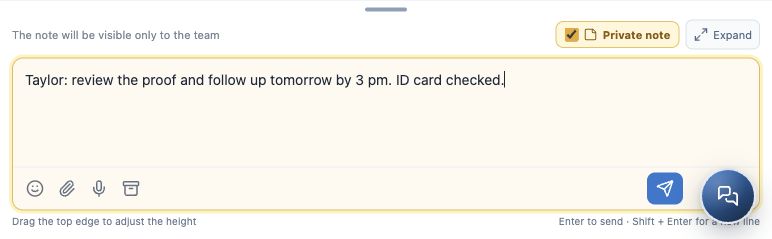
A useful handover summary
Example: “ID card checked. Received proof still needs review. Taylor will review and follow up tomorrow by 3 pm. Maria has been informed of the deadline.”
Avoid notes such as “check later” without context or an owner. Writing a colleague’s name in the note does not guarantee a mention or notification: also assign the conversation or arrange collaboration in the appropriate workspace.
Hand over to a colleague
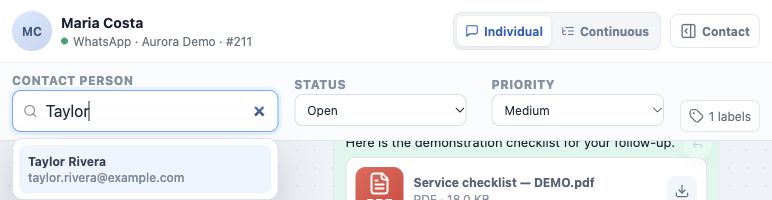
- Open the assigned-person field in the header, shown as Contact person in this interface.
- Type the colleague’s name to search and select the person from the list.
- Check that the selected name remains in the header. Typing alone does not complete reassignment.
- Leave a private summary and confirm the handover with the colleague when necessary.
- For future work, create or update a linked Task with an assigned person and due date. Reassigning a conversation is not confirmation that all related tasks and records were automatically reassigned.
Conversation, record and collaboration serve different needs
A Private note stays in the conversation. Notes in the contact record hold record context and offer their own features, including mentions when available. Internal collaboration is the communication workspace for colleagues. Choose the appropriate feature and keep an outcome summary in the conversation for anyone reviewing its history.
If the colleague is missing, check the name and ask for an agency-access review. Do not assign another person merely to clear your queue.
Confirm the handover
- The note is labeled private in history.
- The correct person is selected in the header.
- The colleague has context and the client knows the next action.
- The pending deadline is recorded for follow-up.
Continue with Track and close a service conversation.
Keep learning
- Get to know Conversations
- Start, reply to and follow a conversation
- Send files, images and audio messages
- Use canned responses and message templates
- Track and close a service conversation
- Request documents and signatures
- Create and track policies
Updated October 24, 2026.