Who this is for: Users who work as insurance producers
The Producer identifies the professional responsible for insurance production in the agency. Configure your own information before being selected as the responsible Producer for a policy or form.
Step by step
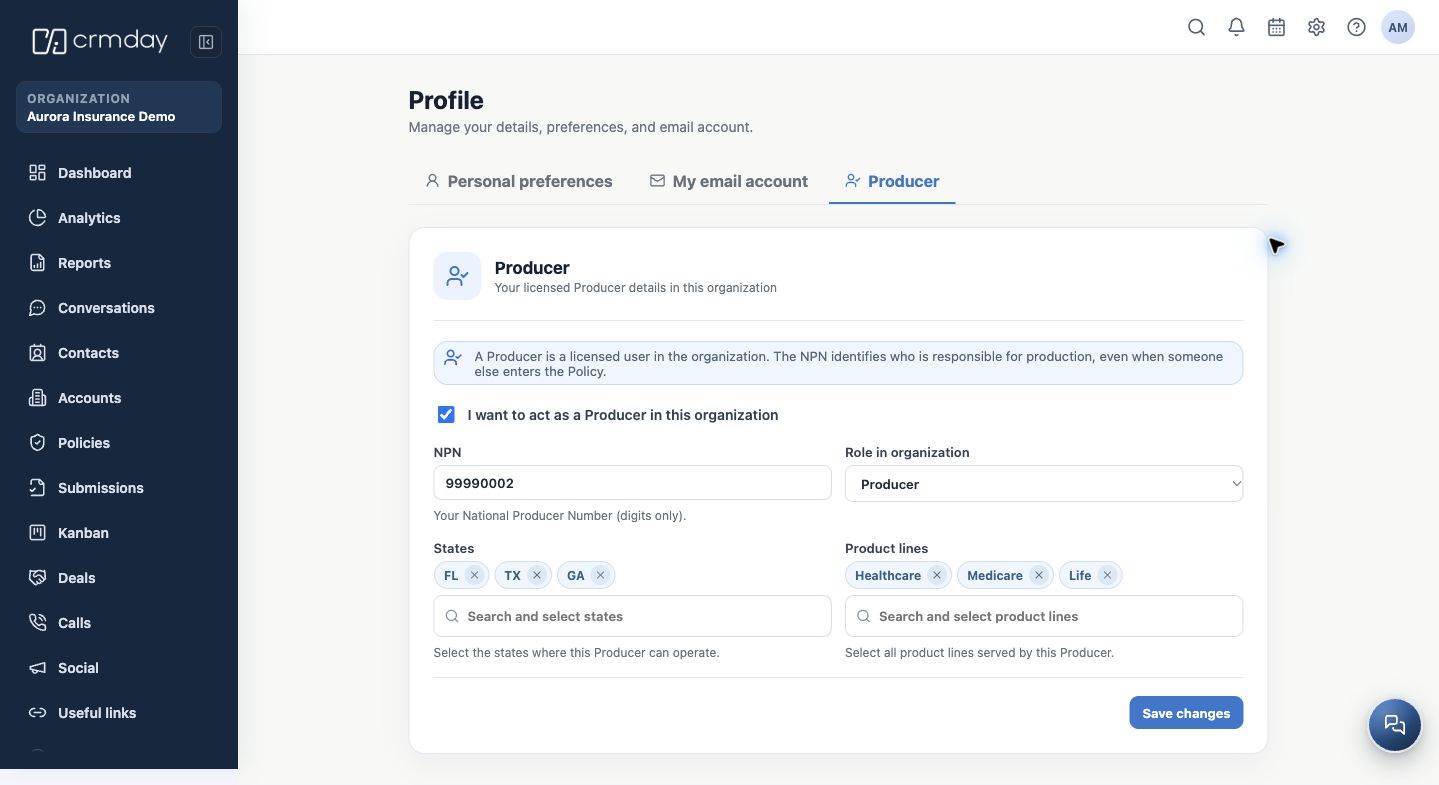
- Open User menu → Edit profile → Producer. This tab depends on the Insurance workspace and your agency membership.
- If you perform this role, select I want to act as a Producer in this organization. If you only provide operational support, ask your administrator whether you should enable it.
- Enter your NPN using digits only. The number 99990002 in the screenshot is fictitious; enter your own professional registration number.
- Check Role in the organization. Changing this role may be restricted to administrators. Do not select a higher role simply to unlock features.
- Select the States and Product lines you work with. In the demonstration, Alex works in FL, TX and GA with Health, Medicare and Life.
- Click Save changes and reopen the tab to check the NPN, states and products.
The Producer and the agency have different identities
Do not replace your personal professional NPN with the agency NPN. For forms, the responsible Producer is selected when generating the link, and their professional information is inserted into the document.
Completing the CRM record stores operational information. It does not issue a license or by itself establish authorization to work in a state or product line. Use the information approved by your agency.
How to check you are ready
Your Producer record is enabled when applicable, with your own NPN and reviewed operating scopes.