For Insurance agency Owners and administrators.
Guides in this chapter
- Connect WhatsApp using a QR code
- Configure bulk-message limits and schedules
- Prepare the official WhatsApp Meta API connection
- Complete Meta signup: an illustrated walkthrough
- Verify Meta API and prepare templates
- Manage team, connection and authentication changes
Open Channels → Inboxes
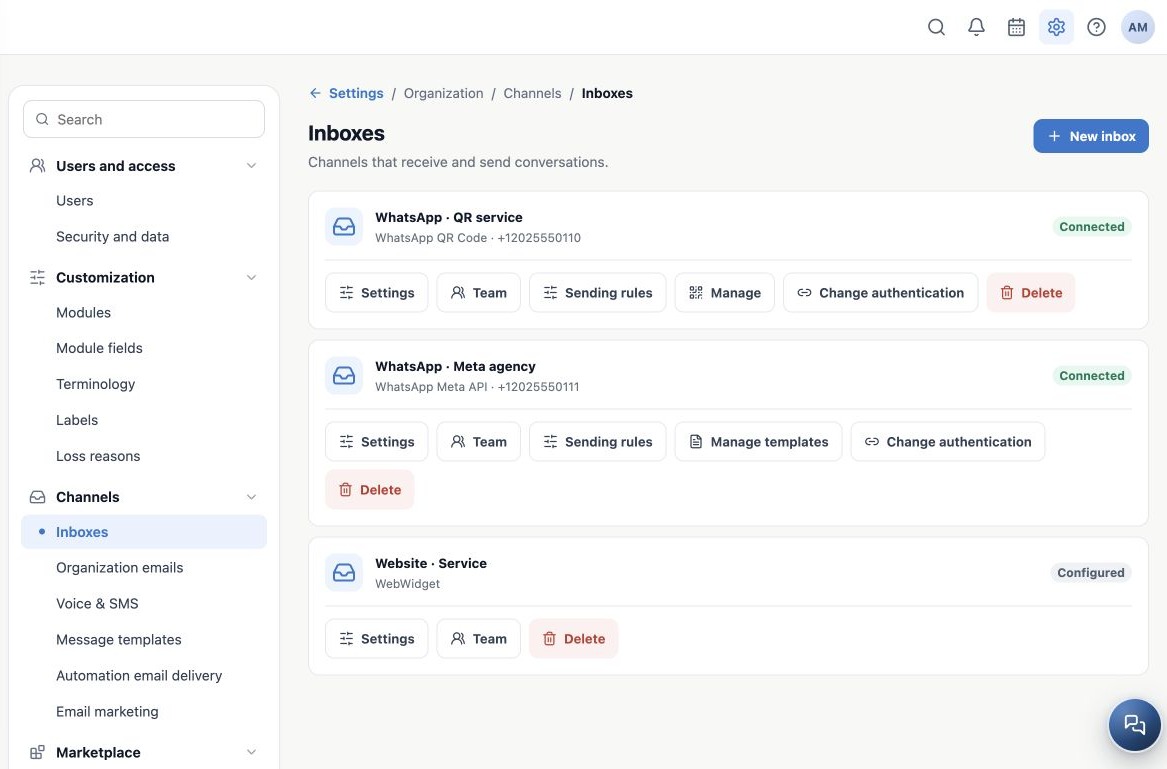
As an Owner or administrator, open Administration → Settings → Channels → Inboxes. An inbox groups conversations for an agency channel or number. Its name helps the team choose the right channel during service. Check the active agency and number before configuring.
Each card identifies its channel, number where applicable and connection state. Configured means a configuration exists; it does not prove an inbound/outbound test. For WhatsApp, check Connected, Connecting, Reconnecting or Disconnected. Use names such as WhatsApp · Service and Website · Service, avoiding personal names when the number belongs to the agency.
Compare the two WhatsApp types
| Aspect | WhatsApp QR Code | WhatsApp Meta API |
|---|---|---|
| Connection | An unofficial integration linking a session by QR code. | The official WhatsApp Business Platform, authorized through Meta signup. |
| CRMDAY setup | Phone number and QR scan in the app. | Connect with Meta, select the account and verify the number. |
| Operation | Depends on the linked session; another scan may be needed. | Depends on the Meta account/number authorization and conditions. |
| Messages | Does not use the official API’s same template rules; that does not authorize unrestricted bulk messaging. | Free-form messages within the service window; outside it, an approved template in the matching language. |
| Campaigns | Unofficial use remains subject to restrictions and bans. | The appropriate channel for authorized business messaging, subject to consent, quality, policies and Meta limits. |
The official API can also face restrictions. Neither option should be described as “ban-proof.” See the official WhatsApp Messaging Guidelines.
Choose the appropriate entry
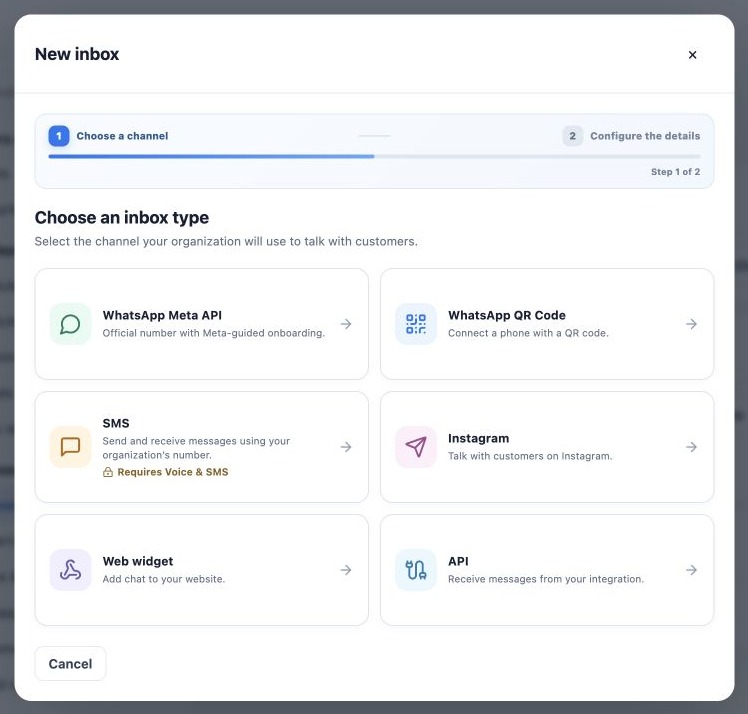
Click New inbox to see available channels. WhatsApp Meta API is the official entry for Owners and administrators. WhatsApp QR Code is the unofficial integration entry. SMS opens Voice & SMS configuration according to your subscription. Instagram authorizes a professional account; Web widget serves your website; API receives messages from an integration.
Availability depends on your plan and access. Personal and organization email accounts have their own email settings. This chapter focuses on both WhatsApp options. The following guides cover connection, rules and verification before releasing the channel to the team.
Configure the other channels
- 07.08 — Set up an SMS inbox
- 07.09 — Connect Instagram for messaging support
- 07.10 — Add website chat with WebWidget
- 07.11 — Create an API inbox for an integration
Related guides
- Connect WhatsApp using a QR code
- Configure bulk-message limits and schedules
- Prepare the official WhatsApp Meta API connection
- Complete Meta signup: an illustrated walkthrough
- Verify Meta API and prepare templates
- Manage team, connection and authentication changes
- Administrator manual
Updated October 25, 2026.