For: CRMDAY One users with the Insurance profile.
What Kanban helps you answer
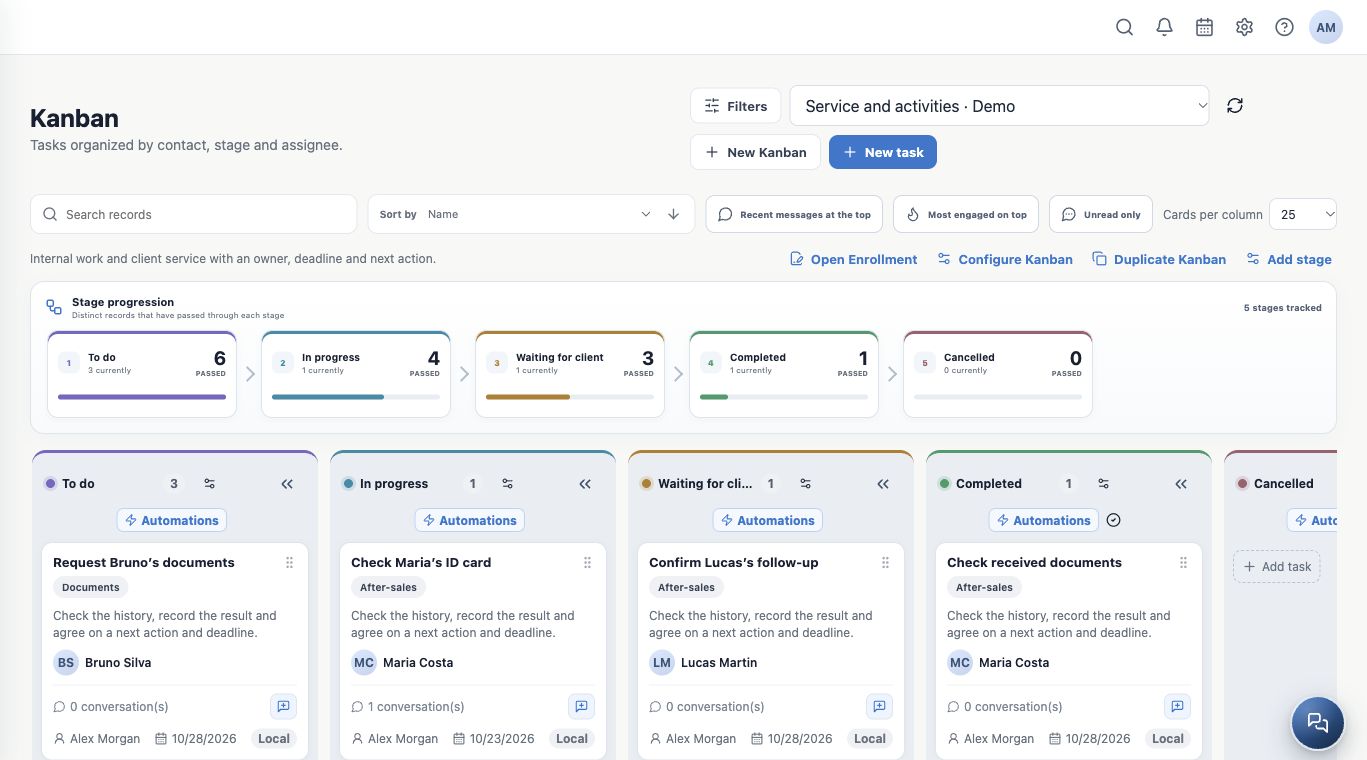
Kanban shows what needs doing, who is handling it and where each activity stands. Every card is a Task; each column represents a process stage. Use separate boards for service, documents, after-sales work, internal activities or campaigns.
The fictitious Aurora Insurance Demo agency follows requests for Maria Costa, Bruno Silva, Elena Rivera and Lucas Martin. A separate internal Task prepares the weekly team summary without a linked contact.
Choose a board for each process
| Example board | Purpose |
|---|---|
| Service and activities | Everyday requests and client follow-ups. |
| Documents and signatures | Requests, review and outstanding documents. |
| Back office | Work handed to another team. |
| Open Enrollment | Annual updates and renewal, following section 09. |
Create separate boards when the workflow or team differs. Use labels to distinguish topics within one workflow. The linked contact identifies the client; you generally do not need a board for every person.
Agree on what each stage means
| Suggested stage | Meaning |
|---|---|
| To do | Created but not started. |
| In progress | Someone is actively handling it. |
| Waiting for client | The next action depends on a reply or document. |
| Completed | The result has been checked and the work is finished. |
| Cancelled | The work will not continue; record the reason. |
Use an explicit advancement criterion, such as “documents received and checked”. Completing a Task does not activate a policy or prove delivery of a message.
Find your priorities
- Open Kanban and select the board at the top.
- Use Search records and Filters. Check active filters before assuming a card is missing.
- Choose the sort field and direction and adjust Cards per column.
- When available, use Recent messages at the top and Unread only to prioritize replies. These controls depend on linked conversations and emails.
- Collapse columns you are not using and expand them when needed. Scroll horizontally to reach other stages.
Separate stage history from current workload
Stage progression counts distinct records that have passed through each stage. “Currently” counts cards in that stage now. Six cards passed through To do in the example, but only three remain there. Do not add the passage counts to count clients: one card can pass through several stages.
Click a stage in this summary to locate its column. Check the card’s deadline, assignee, labels and contact; an overdue date needs a decision about the next action.
Start and finish the day with a clear routine
- Start: review overdue work, recent replies and who will own each pending action.
- During the day: open cards, record results and update the stage or deadline.
- Finish: leave no pending activity without an assignee or next action. Record client dependencies and complete only verified work.
See board setup to prepare the structure and everyday Tasks to handle the work.
Keep learning
- Create and edit Kanbans and stages
- Create and follow Tasks every day
- Automate SMS, email and WhatsApp through stages
- Update and move activities in bulk
- Send bulk messages and follow processing
- Manage Open Enrollment
- Serve your clients
Updated October 24, 2026.