For Insurance agency Owners and administrators.
Understand which name takes precedence
An agency override takes precedence over the inherited product-profile term. Without an override, the system uses the profile term or the product default. Defaults may evolve; an explicitly customized term remains the agency’s choice.
Empty inputs show inherited gray references. The editor can show a canonical reference when the profile has no translation of its own, so also check the actual module in the user’s language. Do not copy a Portuguese reference into every input just to make saving possible.
Restore an item
- Open Terminology and locate the customized term.
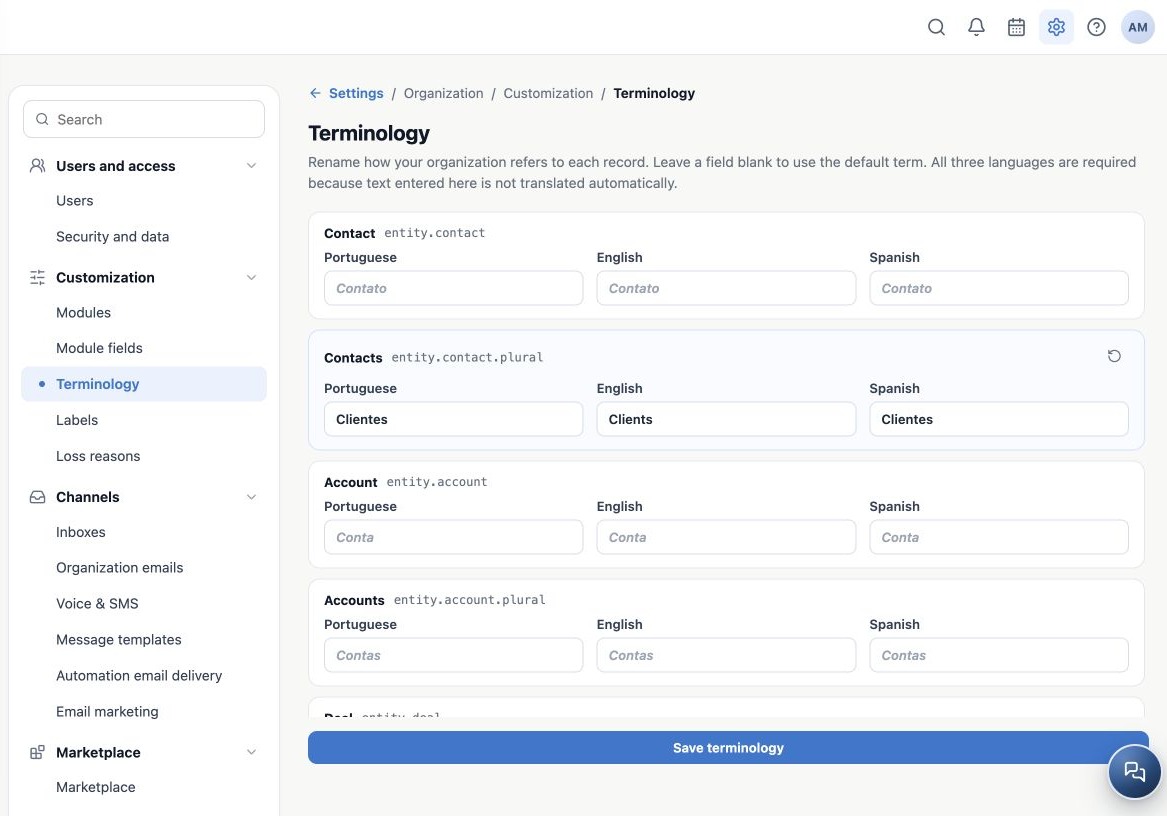
- Click the return arrow, Revert to inherited term, on that row. Its three inputs become empty.
- Review the plural and Related contact separately if they also need to return to the default.
- Click Save terminology. Leaving before saving does not confirm the reset.
- Reopen and check the module. Existing records and relationships remain the same.
The image shows an unsaved reset of the singular while the plural remains customized. To restore everything, reset each customized row and then save. You do not need to delete contacts or recreate records.
When something does not match your expectations
- Cannot save: check all three languages on every changed row and the text lengths.
- Only one name changed: singular, plural and related terms are independent; review each item.
- Another user sees another language: expected; their profile language determines the version.
- A label or field did not change: those have their own settings and are not replaced by Terminology.
- An integration uses the old name: the technical contract stays stable. Do not rename integration fields to match a screen label.
When contacting support, provide the agency, original term, profile language, expected result and affected screen. A screenshot without personal data helps identify the context.
Related guides
- Understand what Terminology changes in your agency
- Customize terms in all three languages
- Labels
- Loss reasons
- Administrator manual
Updated October 25, 2026.