For Insurance agency Owners and administrators.
Prepare an access test matrix
Record previous settings and select representative service, production and management users. Use fictitious records in a test environment and check allowed and denied actions. Testing only with your Owner or Administrator account does not validate an Agent profile.
| Scenario | Expected check |
|---|---|
| Sam opens his own client | Can view and make required changes. |
| Sam opens another agent’s unshared book | Cannot find or open the record once restrictive rules are enforced. |
| Casey receives a shared client for document follow-up | Can access what is needed without exporting or deleting if those actions were not granted. |
| Taylor coordinates a team | Sees the intended scope for team position and profile. |
| An agent opens SSN or another person’s call | Reveals or accesses only when specifically authorized. |
Move from validation to enforcement
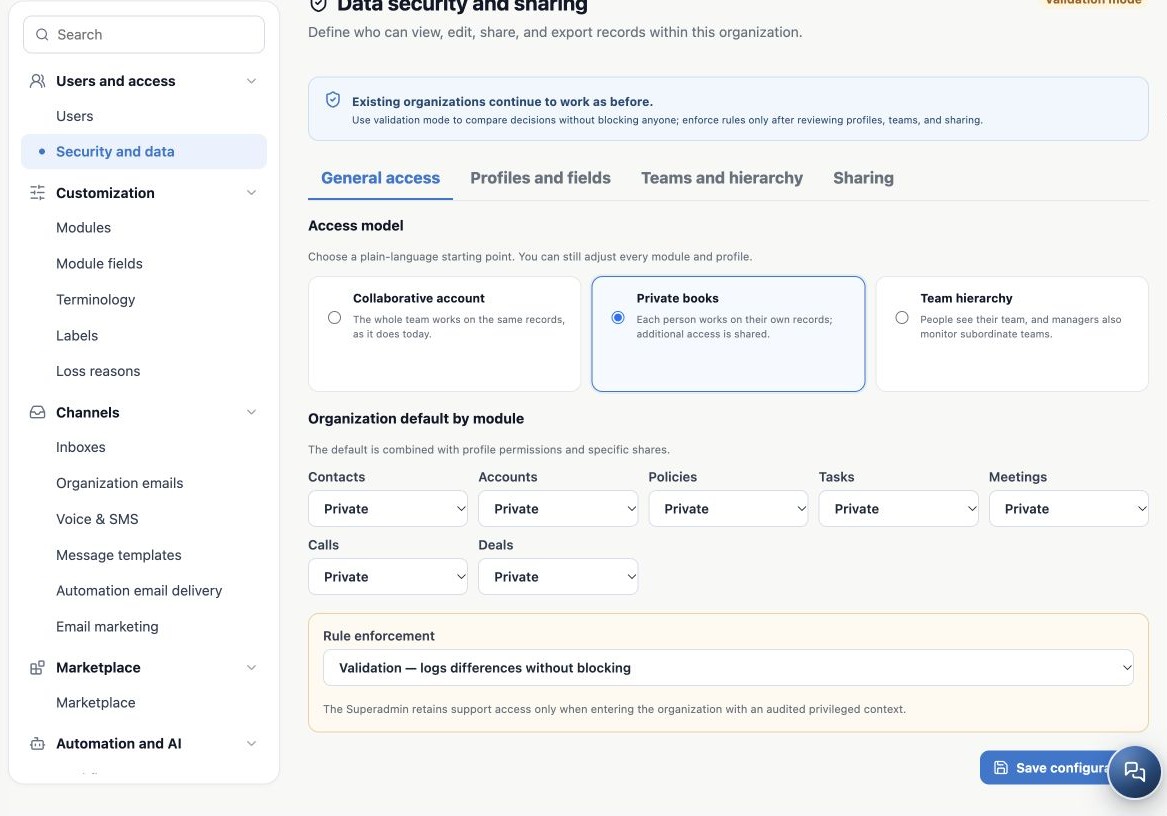
- Under General access, save the model, module defaults and Validation mode.
- Review profiles, fields, teams and shares and record expected results.
- Ask support to review logged differences when that analysis is needed. This screen does not provide a detailed differences report.
- During a planned pilot, choose Enforce — rules control access and save.
- Reopen and confirm the Enforcing rules badge. Test allowed and denied cases with the selected users.
- Check lists, search, direct opening, Kanban, totals, bulk actions and relevant exports. Related data and channels must also work.
Compatibility and Validation preserve previous access and do not prove blocking. If enforcement disrupts operations, an authorized administrator can restore previous settings or Compatibility while investigating. Compatibility restores earlier access behavior: it is an access decision, not a neutral diagnostic switch.
Investigate a missing record or action
- Check the active organization, user status and whether the person signed in with their own account.
- Check module availability and subscription.
- Check search filters and the actual record Owner.
- Review every assigned profile: actions, scopes and fields.
- Review module defaults, teams, hierarchy, rules and time-limited shares.
- Check the effective organization mode and specific Calls and SSN controls.
- For Conversations and email, check inbox membership and sender authorizations in channel settings. A data profile does not replace every channel permission.
If the issue remains, give support the organization, affected user, module, action, time, record identifier and error message. Avoid sensitive details in screenshots; do not send passwords, invitation links or complete SSNs.
An ongoing agency review routine
- Onboarding: confirm accepted invitation, role, profile, team, Producer and first service interaction.
- Role changes: review accumulated permissions and extra access.
- Offboarding: reassign work, deactivate and check channels and successors.
- Periodically: review export, import, bulk actions, broad access and SSN reveal permissions.
- Investigations: use available record audit trails and ask support about administrative events when needed. There is no global audit tab inside this Security and data screen.
This chapter describes the Users and Security and data controls available in the application. These screens do not configure MFA, password complexity policies, backup/restore or data retention. Enabling a permission profile does not configure those features.
Related guides
- Plan users and access for your agency
- Share books and records without changing ownership
- Administrator manual
Updated October 25, 2026.