For: CRMDAY One users with the Insurance profile.
Images show actual system screens in a local demonstration environment with fictitious data. They represent different moments in the examples; stage names and fields may vary by agency.
Contact, Deal, Task and Policy have different roles
The contact identifies the person. A Deal records a sales opportunity. A Task is an action to follow up with a due date. A Policy holds coverage details. One person may have opportunities for different products or occasions; you do not need another contact for each one.
Create a Deal when there is a concrete sales need to track. First check whether an opportunity already exists for the same person, product and negotiation. A new conversation or incoming message does not necessarily require another Deal.
Open Deals and choose the context
- Open Deals from the main menu.
- Check the active agency and select the pipeline above the columns.
- Use the Product selection, search and filters to find the opportunities you need.
- Open a card’s name to view its record. Switch between Pipeline and List to suit the task.
Stage names, their number and automations depend on your agency’s configuration. This module uses a demonstration pipeline with four stages.
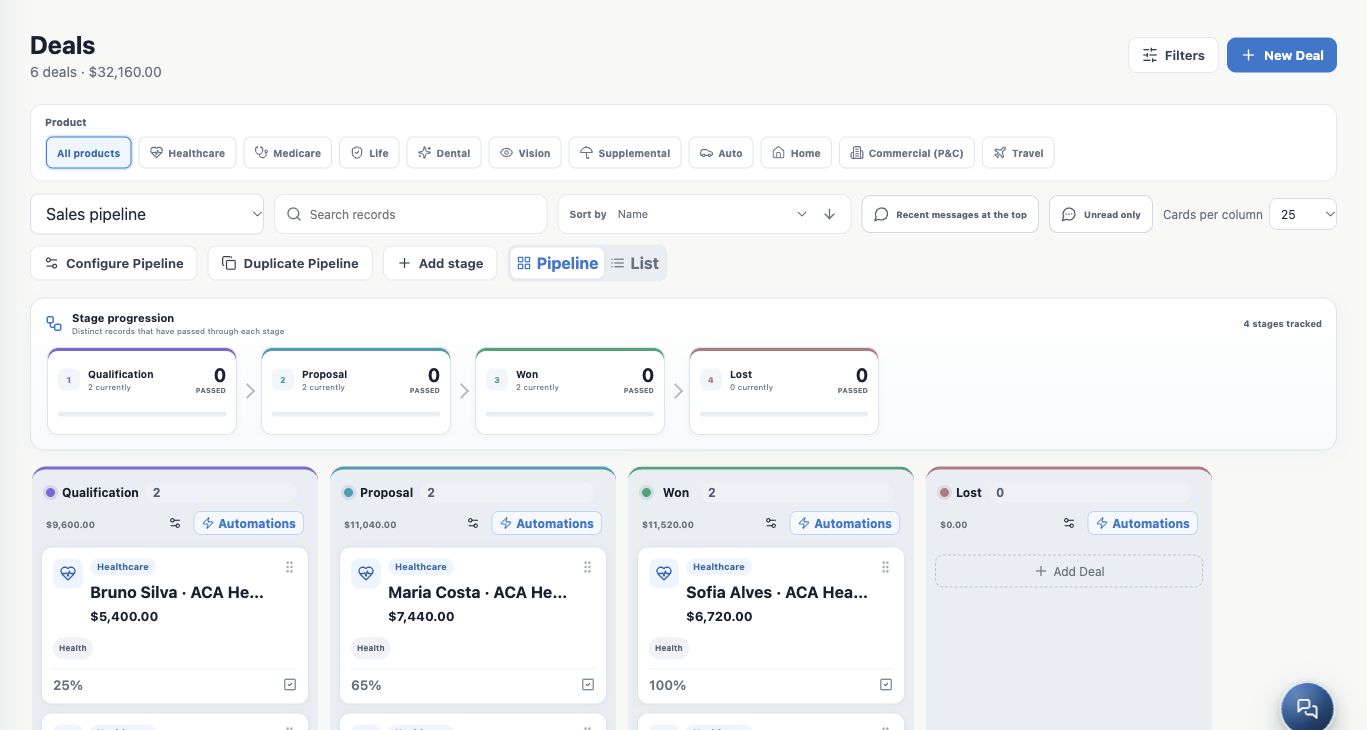
Read the columns as moments in a negotiation
| Example stage | When it fits |
|---|---|
| Qualification | The team confirms the need and gathers information to proceed. |
| Proposal | Options are being presented and the decision needs follow-up. |
| Won | The negotiation has met the agency’s success criteria. |
| Lost | The negotiation ended unsuccessfully, with a reason recorded. |
Maria is in Proposal and Bruno is in Qualification in the example. The stage should reflect what actually happened, rather than simply the time since the last conversation. Probability is a configured sales estimate, not a guarantee of closing.
Understand the figures and choose a view
The header and columns show opportunity counts and amounts in the loaded context. Stage progression distinguishes records that have passed through a stage from records currently in it. Historical figures may differ from today’s card counts.
Use Pipeline to follow the flow. Use List to compare rows and fields such as stage, amount, Owner, contact and expected closing date. Search, product selections and filters can restrict what appears; check them before assuming a Deal is missing. Columns have card limits and a Load more action when more pages are available.
Your start-of-day routine
- Review open opportunities and agreed follow-ups.
- Open the record, check related information and confirm the next step.
- Update the details, record a task when needed and move the stage after real progress.
You are ready when you can find an opportunity, explain its current stage and identify who should act. Continue with Create a Deal linked to a contact.
Keep learning
- Create a Deal linked to a contact
- Update and move your opportunities
- Record tasks and track the next step
- Close an opportunity as won or lost
- Find and organize your clients
Updated October 24, 2026.