For Insurance agency Owners and administrators.
Prepare the agency’s professional account
An Instagram inbox groups service messages from the authorized profile. For example, a visitor asks about renewal in Direct and your team replies in Conversations. This connection handles messages; Social has its own authorization and publishing purpose. Connecting Social does not prove a service inbox exists.
Have authorized access to the correct professional profile and business assets requested in Meta’s window. Check the active agency before starting. Personal accounts or insufficient access can prevent connection. If the flow requests a linked Page or business permissions, the asset administrator must prepare them; do not select another agency’s account just because it appears.
Start with the CRMDAY wizard
- Open Administration → Settings → Channels → Inboxes → New inbox.
- Choose Instagram.
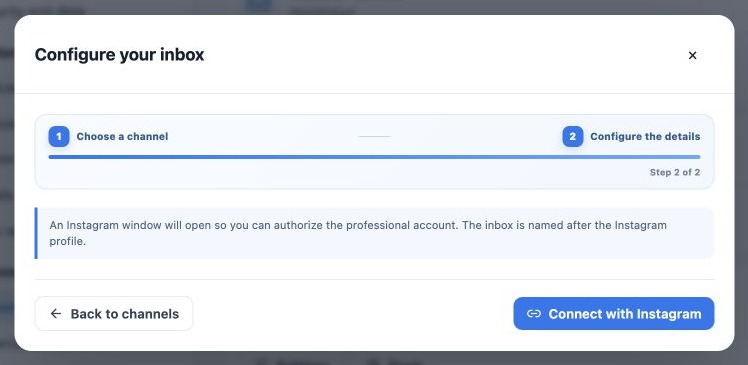
- Read the instructions and click Connect with Instagram. No inbox name is requested: it initially uses the authorized profile name.
- Keep the wizard open while completing authorization in the other window. If blocked, use Open Instagram authorization when that link appears.
The capture shows the actual CRMDAY starting screen with fictitious data. No external account was authorized for the manual. Login and permission screens can change; check the fields your window requests before continuing.
Check identity and authorized assets
- In the external window, check the identity with professional-profile access. Switch if it belongs to the wrong person or business.
- Choose the correct profile and assets from the displayed options. Review permissions for receiving and replying to messages.
- Complete only with authorization to represent the agency. Enter passwords and verification only on the service’s official domain.
- Wait for CRMDAY to recognize the new inbox. Once detected, the wizard can close the window and refresh the list.
- If canceled or closed early, check the list before retrying. Reconnecting an existing profile can retain its previous inbox; no new inbox does not mean the old connection was removed.
The wizard waits for a limited time. If authorization is incomplete, check profile, permissions and popup handling before restarting from CRMDAY. Avoid several simultaneous attempts.
Assign the team and test Direct
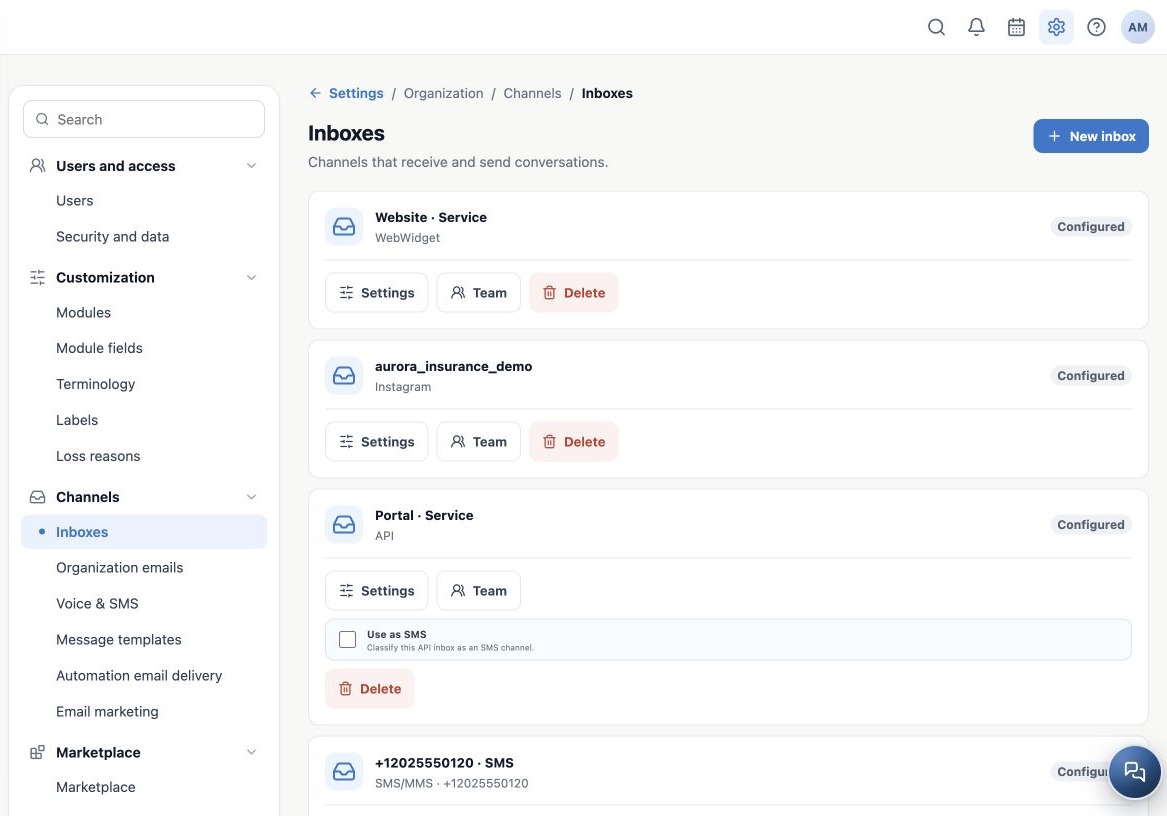
- In Inboxes, find the profile and verify the Instagram channel.
- Click Team, select agents and save. Settings can change the inbox display name; it does not switch the connected profile.
- From another authorized account, send a new message to the agency profile.
- In Conversations, find the Instagram inbox and test message, check the sender identity and reply.
- Confirm receipt in Instagram and test an assigned agent’s access.
Use the inbox for eligible channel conversations. Do not treat followers as a phone list for bulk sends or apply WhatsApp-approved templates to Instagram. Reply availability depends on current channel rules and permissions.
If the message does not appear
| Check | What to verify |
|---|---|
| Profile and agency | Was the intended professional profile and organization authorized? |
| Inbox list | Did it already exist? Is the attempt complete or still waiting? |
| New test | Does a new message arrive? Do not assume all historical Direct messages are imported. |
| Team and filters | Is the agent assigned and the inbox included in filters? |
| Reply unavailable | Check permissions, connection and displayed guidance; do not delete the inbox as a test. |
For support, provide profile, inbox, time and visible error. Do not send passwords, authentication codes or client messages. For authorization problems, restart with the administrator of the correct assets.
Related guides
- Understand inboxes and choose your channel
- Connect WhatsApp using a QR code
- Configure bulk-message limits and schedules
- Prepare the official WhatsApp Meta API connection
- Complete Meta signup: an illustrated walkthrough
- Verify Meta API and prepare templates
- Manage team, connection and authentication changes
- Set up an SMS inbox
- Add website chat with WebWidget
- Create an API inbox for an integration
- Administrator manual
Updated October 25, 2026.