For Insurance agency Owners and administrators.
Check prerequisites
| You need | Why to check first |
|---|---|
| Owner or administrator in CRMDAY | Official connection and agency settings require this access. |
| Authorized access to the business in Meta | Use the identity allowed to manage the right business assets. Personal login and business portfolio are different concepts. |
| An agency-controlled number | Be able to verify it through the method Meta offers. Do not use a client number. |
| Business details | Have the business name, email, country, website when requested and time zone. Use your actual company data in real signup. |
| Number status | Know whether it is in WhatsApp Business App, another API or another organization before starting. |
The WhatsApp Business account, often called WABA, groups business WhatsApp assets. The business portfolio represents your company in Meta; the number is the line your team will use. Verify all three to avoid authorizing the wrong company.
Open signup from CRMDAY
- In Channels → Inboxes, verify the active agency.
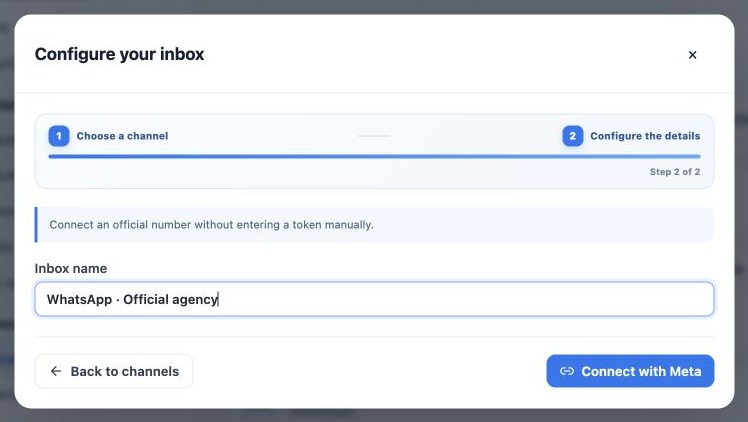
- Click New inbox → WhatsApp Meta API.
- Enter a name with at least two characters, such as WhatsApp · Official agency.
- Click Connect with Meta. Allow the authorization window when your browser prompts and keep CRMDAY open.
- Complete the illustrated steps in the next guide in Meta’s window, then wait for CRMDAY to finish.
Guided onboarding does not ask the agency administrator for a permanent token, API key, App Secret or manual webhook setup. If the connection is unavailable, contact the platform administrator. Do not send passwords or SMS codes to support.
Existing numbers, coexistence and billing
If the number already uses a QR Code inbox, plan the same inbox through the Change authentication guide to preserve history. If it belongs to another API or organization, confirm the migration procedure first. Do not delete the app account, remove Meta assets or create a duplicate account to try to free the number.
Meta offers coexistence in eligible, enabled flows, allowing WhatsApp Business App and official API use. It is not guaranteed for every number or CRMDAY configuration. A QR in the official signup may be part of that verification; it is not CRMDAY’s unofficial QR Code inbox. Meta may require additional verification or payment setup. A CRM subscription does not automatically include message credit or billing.
Related guides
- Understand inboxes and choose your channel
- Connect WhatsApp using a QR code
- Configure bulk-message limits and schedules
- Complete Meta signup: an illustrated walkthrough
- Verify Meta API and prepare templates
- Manage team, connection and authentication changes
- Administrator manual
Updated October 25, 2026.