For Insurance agency Owners and administrators.
Choose the organization role carefully
| Role | When to use it |
|---|---|
| Owner | Main organization responsibility. Keep at least one active Owner. |
| Administrator | A person who needs to manage the team and organization settings. |
| Agent | A person operating clients, conversations, tasks and sales according to the plan and permissions. |
The role is not the person’s sales job title. An agency Administrator is different from a platform Superadmin. Superadmin support operates with a selected organization and an audited privileged context; this role is not assigned from your team’s role selector.
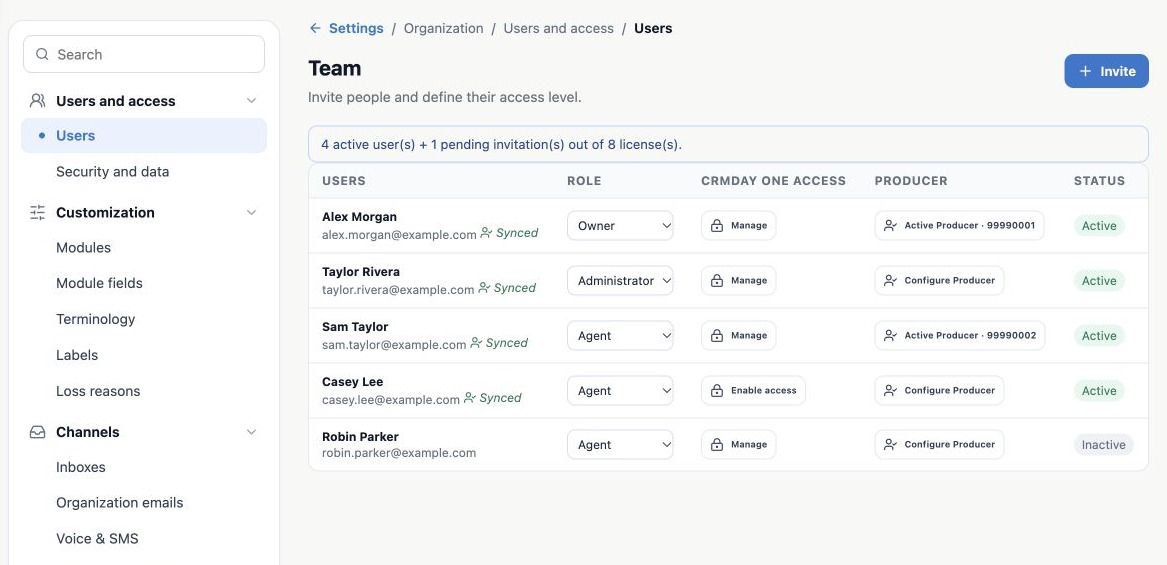
Change a team member’s role
- In Settings → Users, identify the person by name and email.
- Select the new Role. The change is sent when you select it.
- Reload and confirm the saved role.
- Also review profiles under Security and data → Profiles and fields. A role change does not remove the need to review additional profiles and existing shares.
Do not demote or deactivate the last active Owner. If the responsible person is leaving, first prepare another active Owner and verify their access.
Prepare offboarding before changing status
- Identify the book, document follow-up tasks, Deals and scheduled work.
- Reassign records to the intended successor in the relevant modules, using the available permissions.
- Review service assignments, teams, automatic rules, manual shares and email/channel authorizations.
- In Users, click Active to deactivate membership in the organization.
- Reopen the screen and confirm Inactive. Review records and work received by the successor.
The current Users screen has no successor selector when deactivating. If operational references remain, the system selects another active member, prioritizing Owner, then Administrator, then Agent. Reassign beforehand to control who receives the book. Without an eligible replacement, the operation is blocked.
What deactivation changes
Deactivation affects membership in this organization. It preserves history and does not automatically delete the person’s identity in other organizations. Operational responsibility is handled to maintain continuity. The person’s personal mailbox and calendar connection in this organization are suspended, and their shared-sender authorizations are removed.
Do not confuse operational reassignment with changing the policy’s Producer, AOR or commercial history. Review those separately and disable the person’s Producer affiliation when needed. Reactivation checks license capacity; review channels, profiles, access and assignments before returning the person to work.
Related guides
- Plan users and access for your agency
- Invite users and enable their first sign-in
- Configure your agency’s Producers
- Validate rules and maintain everyday security
- Administrator manual
Updated October 25, 2026.